
In short: Odoo Maintenance keeps every machine as one row in a list, and the standard equipment form has no field that says one asset belongs to another. For a plant with lines, machines, motors and bearings, that leaves the structure in naming habits and in people's memory. This article explains what a parent and sub-asset hierarchy adds to Odoo Maintenance, using the Asset Hierarchy Tree View module from Do Incredible: an interactive tree, a full location path for every asset and a Sub-Assets tab on the equipment form. It covers what Odoo already gives you, what the module adds, which versions it runs on and what to check before you install it.
Table of Contents
- Why a flat equipment list stops working
- What Odoo Maintenance already does
- What an asset hierarchy looks like
- What the Asset Hierarchy Tree View adds
- The equipment form: parent asset and sub-assets
- The interactive tree
- What to check before you install it
- More maintenance modules from Do Incredible
- Versions, licence and price
- Frequently asked questions
- Get the module and talk to us
Why a flat equipment list stops working
Picture a Monday morning on a production floor. A press on line 3 has stopped. The technician opens the equipment list, types "motor" and gets six results. Nothing on the screen says which of those motors drives that press.
The list is not wrong, it is flat. Every asset is a row of its own, so the fact that a bearing sits in a motor that drives a press on line 3 lives in naming habits such as "L3-PRESS-MOTOR-2", or in one person's memory. A hierarchy puts that structure into the data, where it can be searched and read instead of guessed.
The table shows where a flat list breaks. The right-hand column follows what the module's Odoo Apps Store listing says it does.
| Where a flat list breaks | What the hierarchy does instead |
|---|---|
| Nobody can tell which motor belongs to which press. | Every asset shows its full parent path, for example Asset 1 / Asset 3 / Asset 4. |
| Finding one asset among hundreds takes scrolling. | Live search filters the tree as you type, with no page reload. |
| A machine's parts are scattered across the list. | The parent's equipment form has a Sub-Assets tab that lists its children. |
| Adding a component means leaving the screen you are on. | A sub-asset can be created straight from the tree. |
| Long lists get heavy to open. | Branches load only when you expand them. |
What Odoo Maintenance already does
Odoo's documentation defines equipment as any item used in everyday operations: a machine on a production line, a tool used in different locations or a computer in an office. The Odoo 19 documentation page Add new equipment lists these fields on the equipment form:
- Equipment Name and Equipment Category
- Company, which can be your own or a third party's
- Used By: an employee, a department or both
- Maintenance Team and Technician
- Used in location, described as a simple text field
- Work Center
A Product Information tab adds the vendor, model, serial number, effective date, cost and warranty expiry. A Maintenance tab shows failure figures: the expected and the calculated mean time between failures, the latest failure and the mean time to repair. Maintenance requests then schedule corrective or preventive work against a piece of equipment or a work center.
That is a solid base. What the list does not contain is a field that says one piece of equipment is part of another. You can group by category or type a location, but the parent relationship is missing. That is the gap this module fills. The documentation page above is written for Odoo 19, so check your own version.
What an asset hierarchy looks like
The structure below is an invented example for illustration, not data from a customer.
- Plant
- Line 3
- Press 3A
- Main motor
- Drive-end bearing
- Non-drive-end bearing
- Hydraulic unit
- Main motor
- Conveyor 3B
- Press 3A
- Line 3
With a tree like this, the question from Monday morning has one answer: open Press 3A and read its sub-assets. The full path of a bearing, Plant / Line 3 / Press 3A / Main motor, tells a technician where it is before they walk to the line.
What the Asset Hierarchy Tree View adds
Asset Hierarchy Tree View is a Do Incredible module for the Odoo Maintenance app. Its listing describes six features:
- Unlimited asset levels. Parent-child relationships with no limit on depth.
- A fast, expandable tree. Nodes load only when expanded, which the listing says keeps it smooth with thousands of assets.
- The full location path. You see where every asset sits through its complete parent path.
- Live search. Type part of an asset name and the tree filters at once, with no page reload.
- Quick child creation. Create sub-assets from the tree without navigating away.
- An enhanced equipment form. Manage parent assets and sub-assets directly from the equipment form.
The equipment form: parent asset and sub-assets
Each equipment record gets a Parent Asset field and a Sub-Assets tab. In the listing's screenshot, a Sub Assets smart button sits next to the standard Maintenance one. The tab lists the child assets with their name, category, responsible person, number of sub-assets and level, and below it the form shows three values: Total Sub-Assets, Hierarchy Level and Full Path. Relationships are assigned on this form.
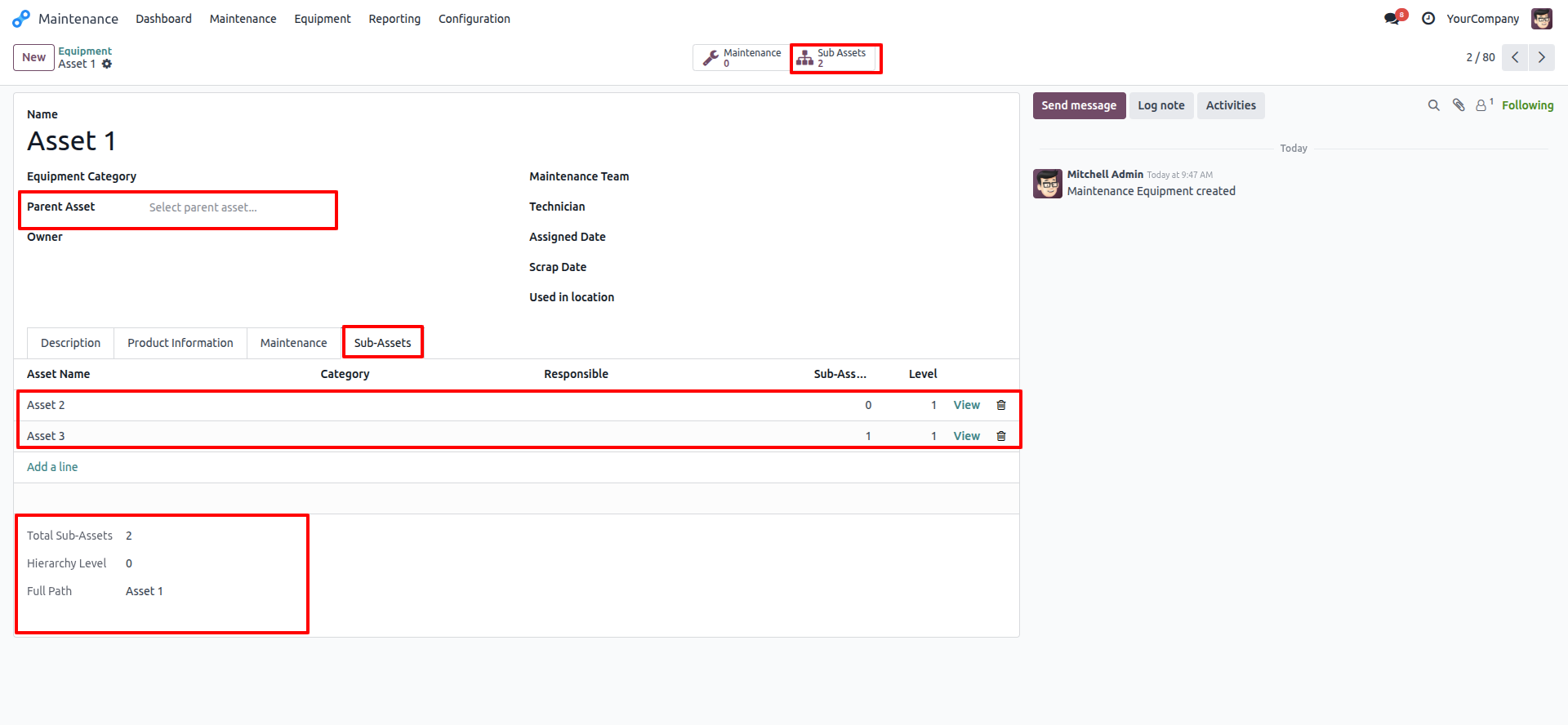
Equipment form with the Parent Asset field and the Sub-Assets tab. Screenshot from the module's Odoo Apps Store listing, with demo data.
The interactive tree
The module adds a button to the view switcher on the Equipment screen. In the listing's screenshot it sits between the kanban and list icons and is marked with a red box. One click opens the tree.
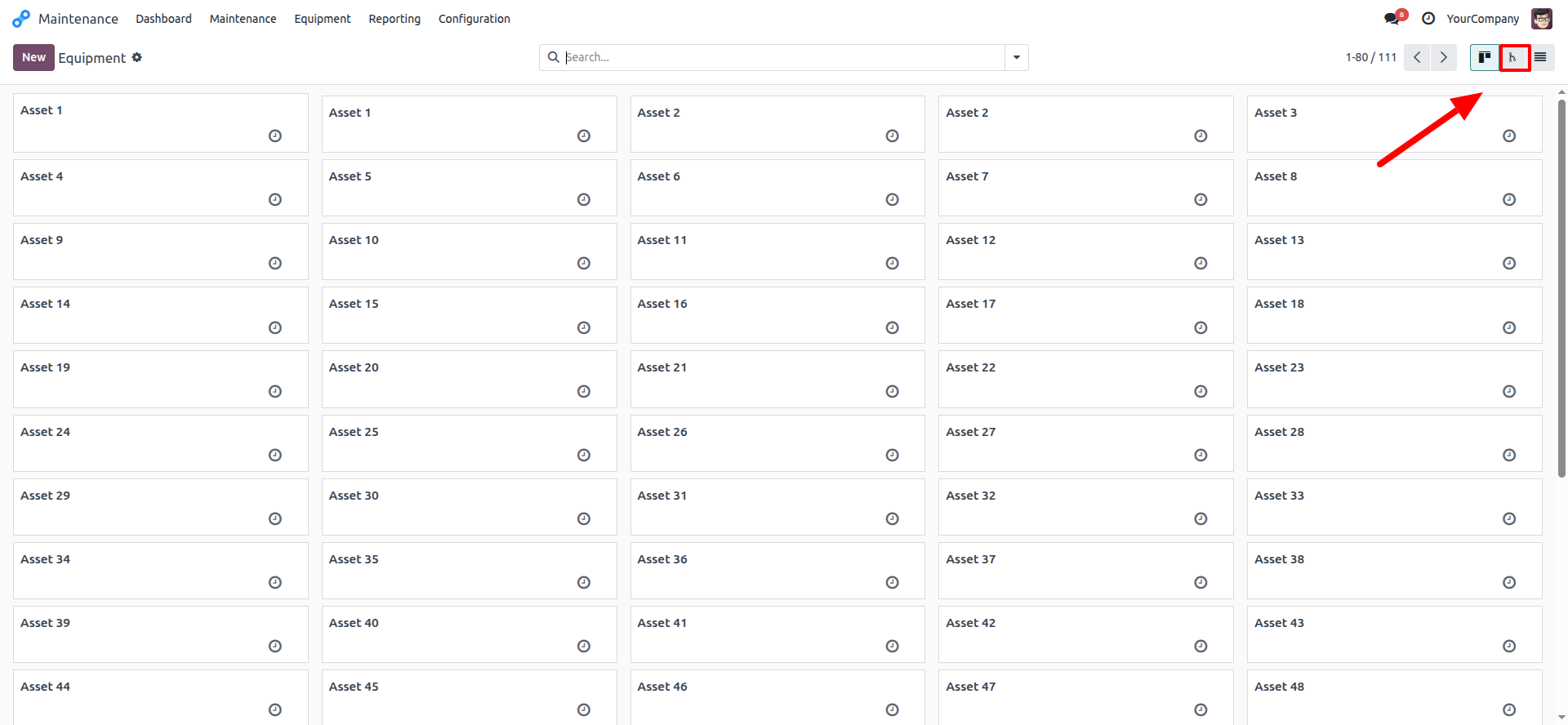
The new tree view button in the Equipment view switcher. Screenshot from the module's Odoo Apps Store listing, with demo data.
The tree has a search box at the top, one row per asset, the parent path in small grey text under each name and a count badge on assets that have children. Each branch has a round button to expand or collapse it, and there is a round plus button at the lower right. The deepest rows in the screenshot carry paths more than ten levels long, which shows there is no fixed depth limit.
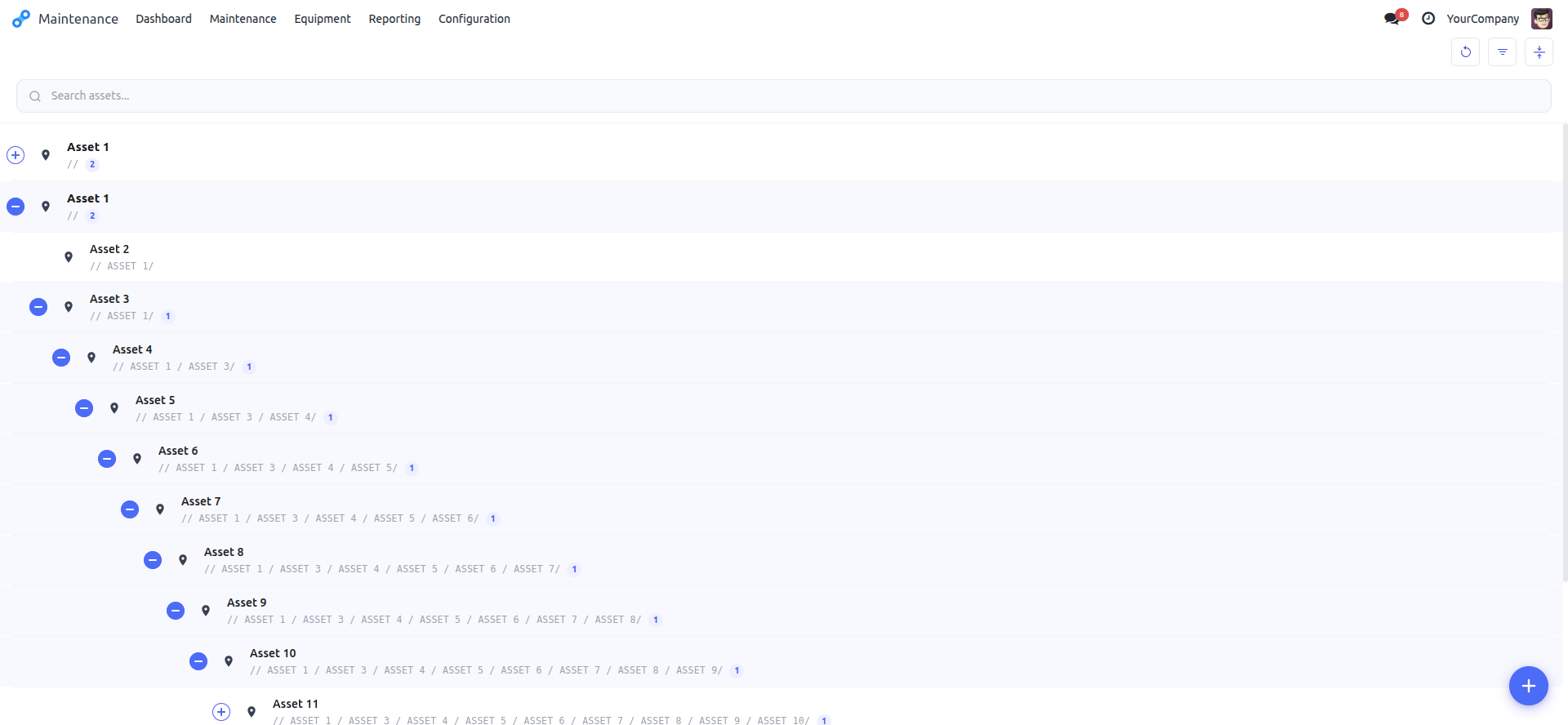
The interactive asset tree. Screenshot from the module's Odoo Apps Store listing, with demo data.
What to check before you install it
The module gives structure to equipment you already track in Maintenance. It does not replace the Maintenance app. Before you install it:
- Maintenance is installed and in use. It is the module's dependency, together with Discuss.
- Your Odoo version is 18, 19 or 20. The store lists a separate release for each.
- Decide what a top-level asset is. A site, a line or a machine can all work. The module lets you choose, it does not choose for you.
- Try it on a copy of your database first. The listing describes the equipment form and the tree. It does not describe how the tree relates to maintenance requests, work centers or reports, so see how your own workflows behave.
- Existing equipment stays as it is. You assign parents on the equipment form, one record at a time.
It suits plants, workshops and facilities teams that track machines inside machines. A business with a short, flat list of equipment will not need it.
More maintenance modules from Do Incredible
A hierarchy is one piece of the picture. Our shop also carries Maintenance-related modules built for specific industries. Each line below follows the description on its shop page:
- Transport Management Fleet Maintenance: preventive maintenance plans, workshop job cards and downtime tracking for the fleet.
- Hospital Management Equipment: a medical equipment registry, QR labels, AMC and calibration.
- Farm Equipment & Machinery Usage: a farm equipment register, machinery usage logging and hour-based preventive maintenance.
- Boat & Yacht Hospitality Management - Maintenance: vessels linked to Odoo Maintenance, with engines, safety equipment, inspections and repairs.
You can browse the whole Maintenance category in the shop. If you like long guides, we also wrote walkthroughs of the Transport Management suite and the Hotel Management suite.
Versions, licence and price
The module is listed for Odoo 18, 19 and 20, for both Community and Enterprise. The table compares what our shop and the Odoo Apps Store showed when we checked on 24 November 2026.
| Odoo version | do !ncredible shop | Odoo Apps Store |
|---|---|---|
| Odoo 18 | $39.00 | $38.18 |
| Odoo 19 | $39.00 | $38.78 |
| Odoo 20 | $39.00 | $39.00 |
Our shop describes the price as one-time with lifetime updates. The Apps Store converts the price, so it moves a little with the exchange rate. Check the page when you buy.
The module is licensed under the Odoo Proprietary License (OPL-1). Its listing says it may be used only with a valid purchased licence, which you get through the Odoo Apps Store or by written agreement with the authors.
Frequently asked questions
Does Odoo Maintenance have parent and child equipment by default?
The Odoo 19 documentation page for adding equipment lists the fields of the equipment form, and none of them is a parent asset. The module adds a Parent Asset field and a Sub-Assets tab. If your version differs, check your own equipment form.
How many levels can the hierarchy have?
The listing says unlimited, with no limit on hierarchy depth.
Will the tree stay fast with thousands of assets?
The listing says nodes load only when you expand them, so the tree stays smooth even with thousands of assets. That is the vendor's description, so test it with your own data on a copy of the database.
Which Odoo versions and editions does it support?
Odoo 18, 19 and 20, on Community and Enterprise. It depends on the Maintenance and Discuss apps.
Does it change maintenance requests?
The listing describes changes to the equipment form and a tree view. It does not describe changes to maintenance requests, so see how requests behave on your own test copy.
How much does it cost?
$39.00 on our shop as a one-time price with lifetime updates. The Odoo Apps Store shows between $38.18 and $39.00, depending on the version.
Get the module and talk to us
See it and buy it. The Asset Hierarchy Tree View on the Odoo Apps Store has the listing, the screenshots and the version for your database. You can also buy it from our own Asset Hierarchy Tree View shop page, at $39.00 for Odoo 18, 19 or 20.
If you run a plant, a workshop or a facilities team and want to see this on your own equipment, we can walk you through it. Do Incredible Technology also handles Odoo implementation, customisation, migration and support, so a rollout can include loading your equipment and agreeing the structure. Book a free consultation and tell us how your machines are organised today.
Contact Do Incredible Technology
- E-mail: info@doincredible.com
- Phone: +91 820 015 0016
- Website: doincredible.com
- LinkedIn: linkedin.com/company/do-incredible
If you liked this walkthrough, the same approach runs through our garage management system guide.