
In short: A hotel does not sell a product off a shelf. It sells a room for a night, once, and then has to bill the guest, clean the room and close the day. This article walks through an Odoo hotel management system built for that job: the Hotel Management Suite from Do Incredible, for Odoo 20. It is 63 Community modules behind one install, and every module is also sold on its own. We follow one guest from the first inquiry to the night audit, show the order to roll the modules out in, and put real prices next to them.
Table of Contents
- Watch the video walkthrough
- Why hotels outgrow spreadsheets and disconnected tools
- Properties, not companies: how the suite is built
- One guest stay, from inquiry to night audit
- Which modules to install, and in what order
- Controls, approvals and the audit trail
- Channels, your website and integrations
- Is the suite the right size for you?
- Pricing and what to check before you buy
- Frequently asked questions
- Get the suite and talk to us
Watch the video walkthrough
Prefer to watch first? This full demo from our YouTube channel runs through the Hotel Management System for Odoo 20, from the front desk to the dashboard. The text and screenshots below follow the same flow.
Video: Watch the full Hotel Management System demo on YouTube (Do Incredible). Suite and price: Hotel Management Suite on the Odoo Apps Store.
Why hotels outgrow spreadsheets and disconnected tools
A stay touches many hands. Reservations take the booking, the desk checks the guest in, housekeeping cleans the room, the restaurant adds a bill, and someone totals it all at checkout. When each step lives in a different tool, the same questions keep costing time. Is this room really free? What does this guest owe? Is the room ready? What was last night's occupancy?
The table shows where a connected system changes the answer. The right-hand column comes from what the module listings on the Odoo Apps Store say each module does.
| Where it usually breaks | What the suite does instead |
|---|---|
| The same room is sold twice. | Rooms per type and night are recounted under a lock on every change, and the database refuses the same room to two stays on one night. |
| The bill is assembled by hand at checkout. | Room nights, taxes, minibar, laundry and restaurant bills all post to one guest folio and leave as one invoice. |
| Nobody knows whether a room is ready. | A room shows ready only once its cleaning is done, and inspected where the hotel asks for it. |
| The business date is whatever the calendar says. | A night audit closes each property's day at its own local hour, so late postings land on the right day. |
| Prices live in a spreadsheet. | Rate plans price every night by season, weekday and occupancy, with stay restrictions and a rate calendar. |
| Channel bookings are re-keyed. | A channel manager pulls reservations into the same guarded booking engine the front desk uses. |
Properties, not companies: how the suite is built
The base module treats a hotel as a property. A company, or one of its branches, can run any number of properties, each with its own time zone, check-in and check-out times, business date, buildings, floors and departments. A single guest house and a group of resorts therefore use the same product.
Feature switches decide what each property runs. They work at three levels (global, company and property), the nearest level wins, and a Capability Matrix shows every feature against every level on one screen. When a feature is off in every property a user works in, its menus disappear for that user, and the server refuses its records anyway. Staff see only the properties assigned to them, and a property switcher in the top bar sets their working property.
The suite is built for Odoo 20 Community, and the listing says it works on Enterprise too. Every hotel record carries a company and a property, so a group can run several properties from one database. The suite itself adds no screen of its own. Every menu belongs to the module that owns it, and what the suite adds is proof that all 63 modules install and work together.
One guest stay, from inquiry to night audit
The clearest way to see an Odoo hotel system is to follow a single guest. The screenshots come from the demo data that ships with the modules, so the names and numbers are sample data.
1. Rooms, guests and rates
Room types carry the rules: occupancy, beds, size, an overbooking limit and a housekeeping workload. Rooms have attributes such as sea view, balcony or accessible, and housekeeping statuses you can rename. A room can be out of order, out of service or held for a period, with a reason.
Guest profiles are one per guest across every property, with preferences and an alert the front desk must see on arrival. Identity documents sit behind a dedicated right, and every change to them is audited. Rate plans price each night by season, period and weekday. Derived plans, such as bed and breakfast or a corporate rate, follow the base rate when it changes, and stay restrictions cover minimum stay, closed to arrival and stop sell.
2. Reservations and the room rack
A booking moves from inquiry and quotation through option, tentative and confirmed to in house, checked out or cancelled, with the cancellation charge its frozen policy sets. An option releases itself when it runs out. Live inventory is recounted under a lock on every change, so two agents cannot sell the last room twice.
On the room rack you see every room against 7, 14 or 31 nights. Drag a stay onto another room to move the guest, or drag its edge to extend the stay.
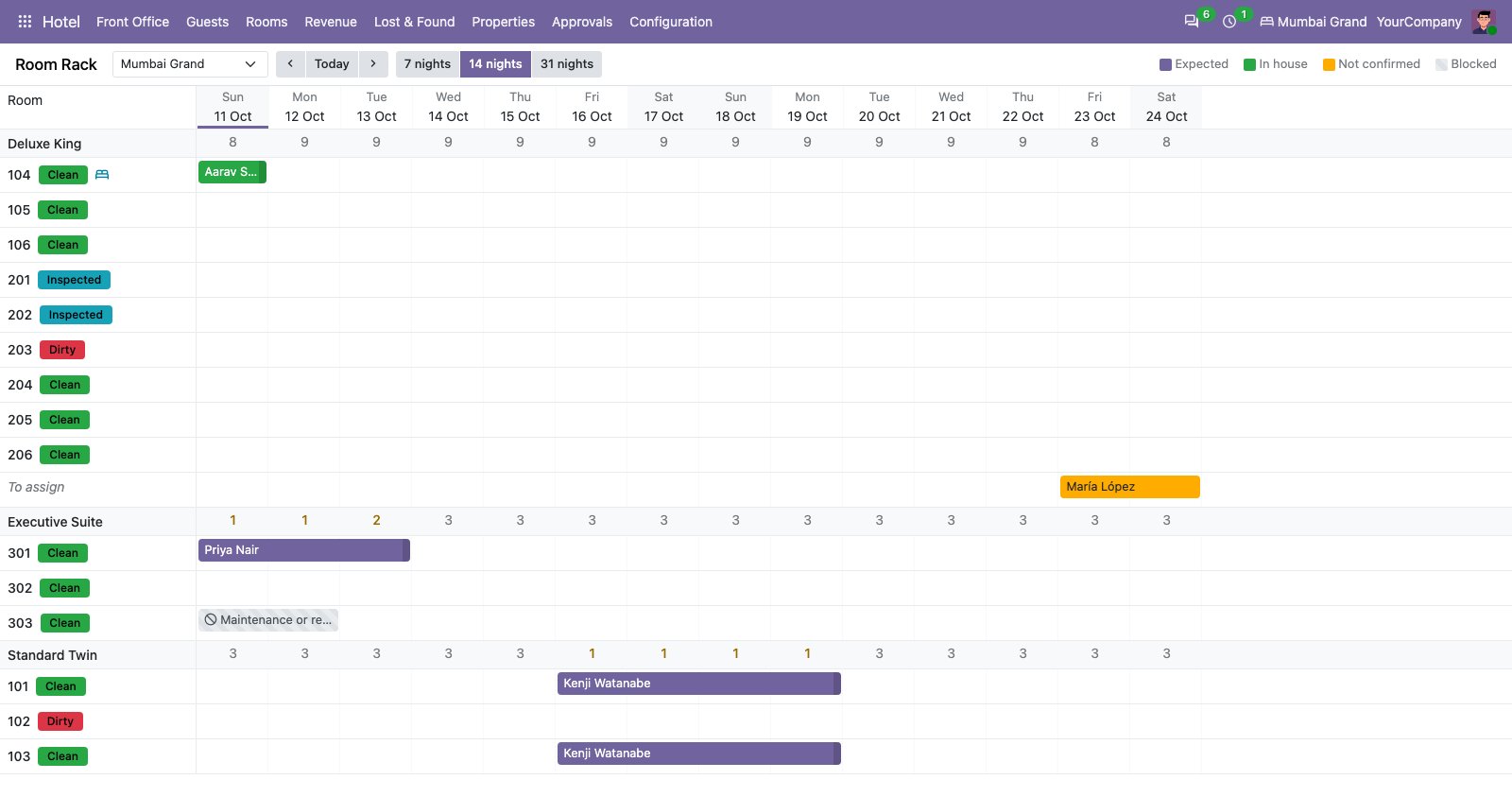
The room rack. Every room against the nights, with its housekeeping status beside it. Stays are bars you can drag.
3. Check-in at the front desk
The front desk board shows today's arrivals, the guests in house and today's departures, with what needs attention: a room not ready, an overdue arrival, an open balance. Check-in means the identity document seen, the registration card signed on screen and the deposit taken. Arriving early or leaving late is charged by rule unless a manager waives it. A walk-in is quoted, booked, given a room and checked in from one screen.
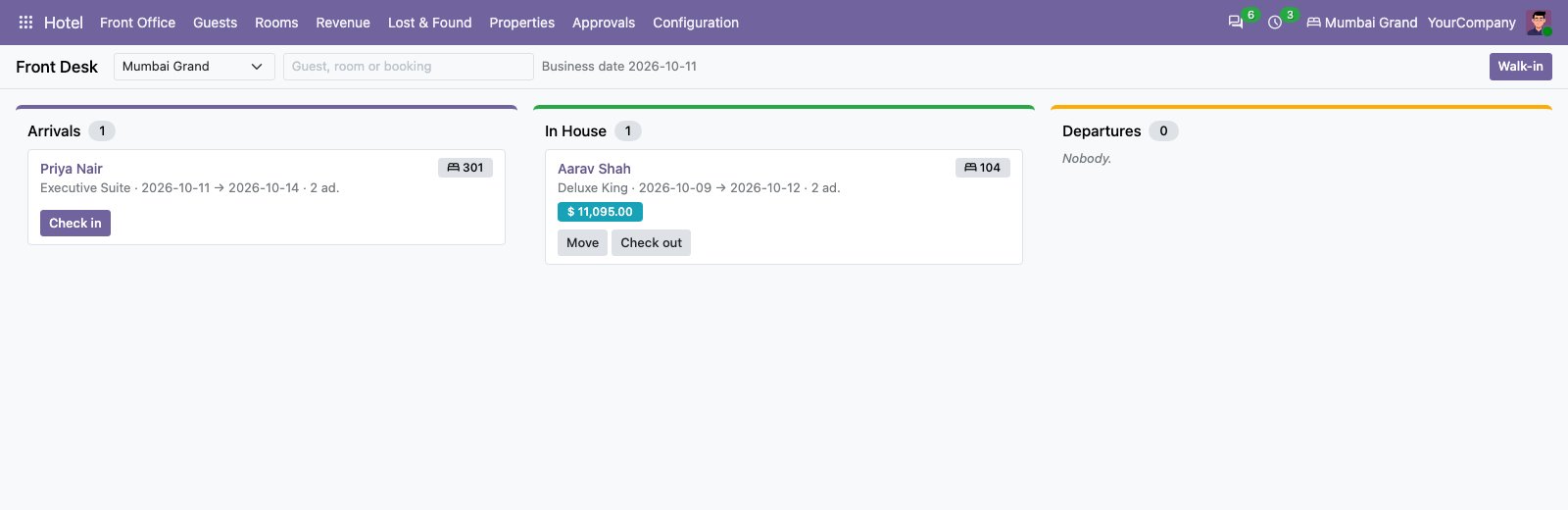
The front desk board. Arrivals, guests in house and departures on one screen, one button each.
4. The guest folio and checkout
Every charge lands on the right bill. Room nights, city tax, minibar, laundry, services and restaurant bills all post through one charge engine, routed by rules: the room to the company paying, the extras to the guest. Room taxes can follow the tariff, for example by price band, and tax-included rate plans are charged to the cent.
Deposits, refunds and a city ledger are built in. A posted charge is corrected by a reversal with its reason, never edited, and cashier shifts are counted per currency when they close. At check-out the nights and any late departure are charged, the folio is invoiced and paid, and the folio is settled before the room goes to housekeeping.
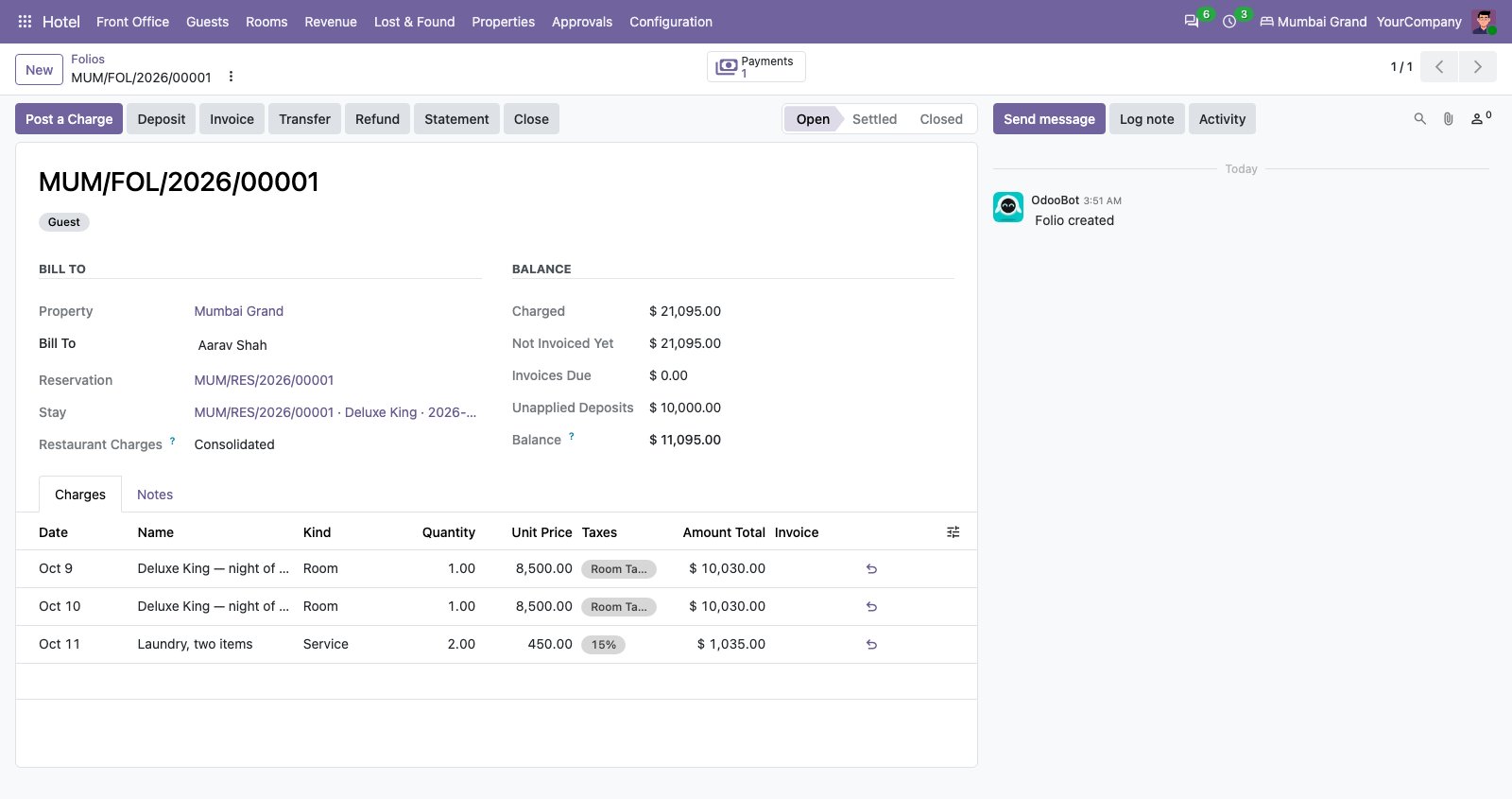
A guest folio. Nights charged with their room tax, an extra, the deposit and what is still owed.
5. Housekeeping
Check-outs, stays and room blocks become housekeeping tasks: a departure clean, a stay-over, an evening turndown, an inspection on the arrival day. Each one is set by a rule, for the group, a company, a property or a room type. Supervisors get a board by floor and a lane per attendant, and tasks can be dragged to an attendant or assigned automatically.
Attendants work from their own phone screen. Where the hotel asks for it, a cleaned room waits for a supervisor's inspection before it is ready, and a failed inspection sends it back at higher priority. Do Not Disturb skips the service and records it instead of deleting it.
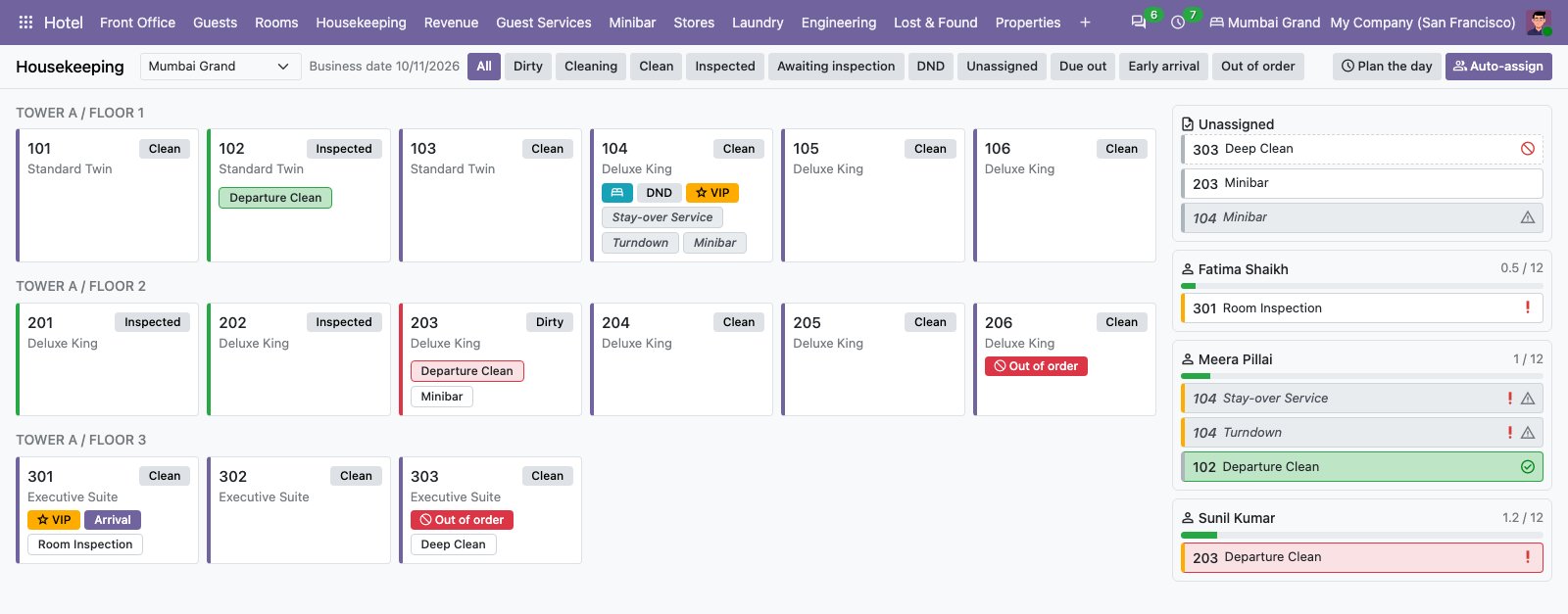
The housekeeping board. Rooms by floor, coloured by status, with each attendant's load on the right.
6. The night audit
The business day closes when the audit succeeds, not by the calendar alone, at each property's own audit hour. It checks arrivals not checked in and departures not checked out, posts room nights and automatic charges, and counts the day. A failed audit waits for the night auditor, who can run it again without charging anything twice.
The day's figures are kept per property and per day: occupancy, ADR, RevPAR, arrivals, no-shows and revenue. The listing says an audit of 500 guests in house posts its 1,000 nights in about a second.
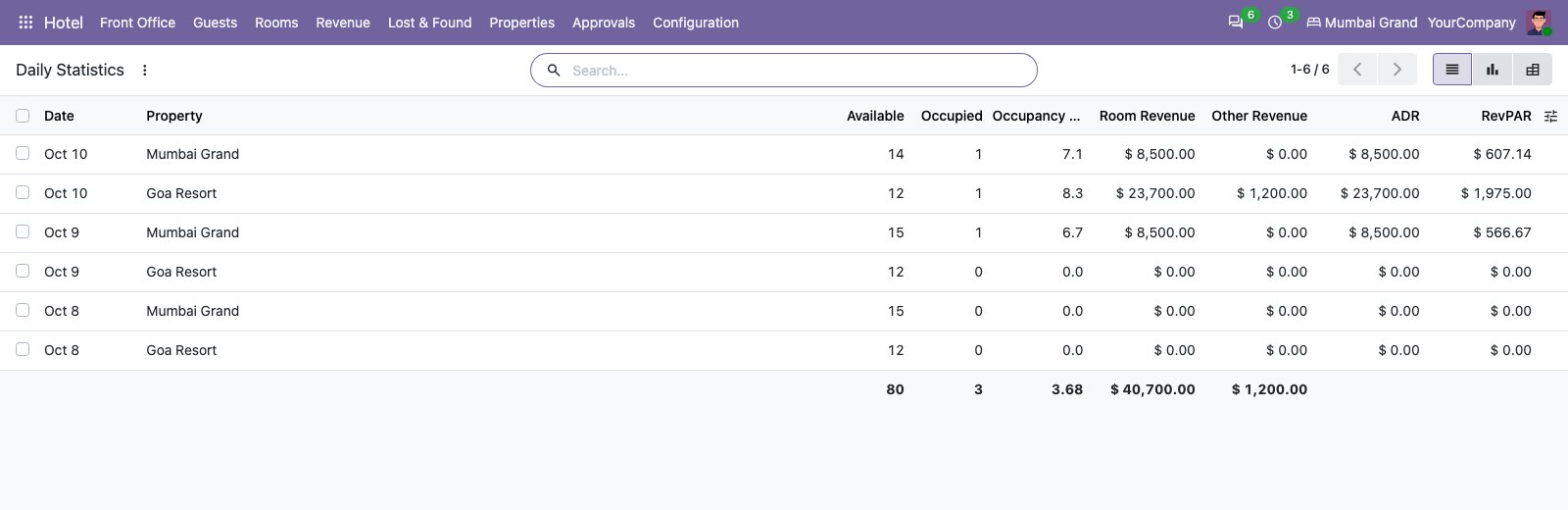
The day in numbers. Occupancy, ADR and RevPAR per property and day, counted by the audit.
7. Restaurants, room service and the kitchen
Restaurants and bars run on Odoo's Point of Sale, with service windows per outlet. A cashier finds the guest by room and surname, or a guest PIN, and the server checks the stay, the payer and the limits before sending the charge to the right folio. A kitchen module routes each dish to a station on a tablet screen, and the kitchen staff hold no Point of Sale rights, so they cannot open a register or see cash.
Which modules to install, and in what order
Each module's listing names what must be installed first. The folio needs reservations, the front desk needs the folio, and the night audit needs the front desk. Housekeeping needs reservations. The suite installs everything at once. If you buy by department instead, the order below follows those dependencies.
| Stage and what you get | Modules and listing price |
|---|---|
| 1. Foundation. Properties, rooms, guests, rates and the booking engine. | do_hotel_base $39, do_hotel_room $88.01, do_hotel_guest $88.01, do_hotel_rate $206.01, do_hotel_reservation $275.01 |
| 2. Desk and money. Check-in, one bill per stay, the closed business day. | do_hotel_folio $344, do_hotel_frontdesk $413, do_hotel_night_audit $482 |
| 3. Operations. Clean rooms, repairs, restaurants and the kitchen. | do_hotel_housekeeping $344, do_hotel_maintenance $393.01, do_hotel_pos $551, do_hotel_kitchen $600 |
| 4. Selling. Your own booking engine, channels, a guest portal and an API. | do_hotel_website $443.01, do_hotel_channel_manager $680.01, do_hotel_portal $629.01, do_hotel_api $443.01 |
| 5. Revenue and loyalty. Pricing that follows demand, corporate accounts and points. | do_hotel_revenue $581, do_hotel_corporate $581, do_hotel_loyalty $581 |
| 6. Reporting and books. Departmental P&L, group reports and a command centre. | do_hotel_account $620, do_hotel_reports $581, do_hotel_dashboard $581 |
Prices are the listing prices when this was written, and they follow the exchange rate. Several modules also name other modules they need, such as the guest portal, which needs the service and feedback modules. The listing for each one says which.
Controls, approvals and the audit trail
A hotel handles cash, discounts and guest data, so much of the suite's depth is control.
- Approvals with thresholds. Rules decide which operations need whose approval, above which amount or percentage. The approver gets an activity, and the operation runs when they approve.
- An audit trail nobody can edit. Who changed what, from which value to which, why, and who approved it. Entries can be neither changed nor deleted.
- Service levels. Target and escalation times per kind of task and priority, with overdue work escalated to the right people.
- Four eyes where it matters. A cleaned room can wait for a supervisor's inspection, and refunds, corrections, house charges and free upgrades run under approval.
- Revenue changes a person signs off. The revenue module proposes price moves and restrictions inside limits you set, and nothing reaches the rate grid until a person approves it.
Channels, your website and integrations
Channel manager. Room types, rate plans and meal plans are mapped to a channel's own codes, with a safety buffer, an allotment cap and an optional mark-up. Every availability change is journalled and retried, and the number pushed is never above what the property actually has free. A reservation pulled from a channel enters through the same guarded booking core the front desk uses, and anything that cannot be placed becomes an exception for a person to resolve, not a silent drop. A test channel that needs no network lets you prove it before connecting a real one.
Your own booking engine. The website module gives every hotel and room type a page, a search that offers only what can really be sold, and a timed hold. Cancellation, no-show and deposit terms are shown before payment, payment goes through Odoo's own payment providers, and the booking is confirmed only once the payment is done.
Guest portal. A private link in the hotel's e-mail lets the guest see the booking, pay what is due, change or cancel it, and register before arrival. The front desk finishes the check-in from what the guest prepared.
API. A versioned JSON interface lives under /hotel/api/v1. Each client is limited to its properties, operations and channel, and acts as a service user, so the API can never do what that user could not do at the desk. Writes are safe to retry, and webhooks are signed. A door-lock and smart-room framework also ships with a simulator, so you can try it before any vendor is involved.
Is the suite the right size for you?
Five questions will tell you how much you need. Do you run one property or several? Do you sell through online channels and need availability pushed to them? Do you run restaurants whose bills go to the room? Do you need a night audit with daily statistics? Do you need housekeeping with inspections?
If you run a handful of rooms with no channels and no restaurant, you may need only the foundation and reservation modules to start, and you can add the rest later. If most answers are yes, the suite saves you from buying and testing modules one by one.
Pricing and what to check before you buy
At the time of writing, the Hotel Management Suite listing shows about $3,515 for the 63 Community modules, installed as one. Every module is also sold on its own, from $39 for the foundation module. Added up at their listing prices, the same 63 modules would cost $33,161.37 bought one by one, so the bundle costs roughly a tenth of that.
Before you buy, check three things on the listing: that you run Odoo 20, which is the only version the suite is listed for, which departments you need first, and the current price, since store prices drift with the exchange rate.
Frequently asked questions
Does the hotel suite work on Odoo Community?
Yes. It is built for Odoo 20 Community, and the listing says it works on Enterprise too.
Which Odoo version does it support?
Odoo 20. The Odoo Apps Store has no Odoo 19 listing for the suite or its base module.
Can I buy only some of the modules?
Yes. Each module is sold on its own, and its listing names the modules that must be installed first.
Can it run several hotels from one database?
Yes. A company or one of its branches runs any number of properties, every record carries a company and a property, and staff see only the properties assigned to them.
Does it prevent overbooking?
The room count is recalculated under a lock on every change, and the database refuses the same room to two stays on one night. The channel manager never pushes a number above what the property has free.
Can guests book and pay online?
Yes, through the website module. Payment goes through Odoo's own payment providers, and the booking is confirmed only when the payment is done.
Get the suite and talk to us
See it and buy it. The Hotel Management Suite on the Odoo Apps Store installs all 63 modules as one app, at about $3,515 on today's listing. Each module is also sold on its own, starting with the foundation module, do_hotel_base, at $39, so you can begin with one department.
If you run a hotel, a resort or a group of properties and want to see this on your own rooms and rates, we can walk you through it. Do Incredible Technology also handles Odoo implementation, customisation, migration and support, so a rollout can include loading your rooms, rates and guests. Book a free consultation and tell us how a guest moves through your hotel today.
Contact Do Incredible Technology
- E-mail: info@doincredible.com
- Phone: +91 820 015 0016
- Website: doincredible.com
- LinkedIn: linkedin.com/company/do-incredible
If you liked this walkthrough, the same approach runs through our transport management system and our garage management system.